
For all the incredibly fast changes in technology in our lives, some things just don’t change at all.
Take the toilet, for example. Still pretty much exactly as it was 50 years ago.
Cars are starting to change, with hybrids and such, and the engines are more efficient and reliable but the basic gas-reliant technology is pretty much the same as it has always been for the vast majority of car owners. I think about that every time I pull up to the gas pump. And what ever happened to the Jetsons’ flying car?
The TV has changed a lot, with color in the 50s and 60s and now HD and DVRs and cable channels and flat screens, etc., but AM radio hasn’t changed a bit. You can still get faraway stations at night if the climate conditions are just right, and if you drive under power lines you still lose your signal. And our local public radio station, which broadcasts only 15 miles from my house, gets all crackly as soon as the sun goes down. Can’t they fix that?
Anyway, with all the focus we always put on our changing technology, I thought it might be fun to think about the technology in our lives that doesn’t seem to change much at all. What else can you think of?
Showing posts with label technology. Show all posts
Showing posts with label technology. Show all posts
Saturday, April 10, 2010


Monday, April 5, 2010
So much technology, so little time
On the day that Apple released its iPad, I was not standing in line to get it.
On the day that Apple released its iPad, our family was celebrating my daughter’s 22nd birthday. We were sitting around the living room as she opened up her present: a new Motorola Droid, an incredible phone that rivals if not surpasses the iPhone in the Wow Factor. When we bought it for her we knew it had some amazing features, but we didn’t know it has a voice recognition browser. Tell the phone what you want, it automatically Googles it for you. It has a built-in GPS and, of course, an MP3 player that syncs with Windows Media, which syncs with iTunes.
We sat around the living room. I had my MacBook Pro and was looking up directions for tethering her new phone to her PC. My 26-year-old son was working on a YouTube video he is creating on his MacBook. My wife had her Mac and, just for fun, was Googling my 90-year-old mother’s name as my mother sat next to her to see what would come up. My sister had her iTouch out and was hooking it up to the Wi-Fi in the house. We all had cell phones with us, including my mother.
So, here we were, six of us of all ages sitting in our living room. Among the six of us, three of us were on our computers, all of us had cell or smart phones (including one iPhone, one Blackberry and one Droid), and we had one iTouch and an iPod in the room, although our background music was coming from the cable box hooked into the stereo system.
It was the day before Easter, and we had rented a movie to play on our Blu-Ray player but we never got around to playing it. We have two HD TVs but never got around to watching them. And the Wii we got a month or so ago was not even turned on, despite the fact we had a cool new Resort game we wanted to play.
On this day that the iPad was released, we clearly already had far more technology to use – and play with – than we had time for. And that’s not to mention the time we spent just talking among ourselves over Easter brunch and playing a highly non-tech bean bag toss game in the backyard.
Sure, the iPad is very cool, and I wouldn’t be surprised if at some point I will purchase one, mainly for newspaper and magazine subscriptions, and maybe even some books. But on the day the iPad was released, my only thought was – how on Google Earth will I find time to work another tech toy into my life?
Thursday, March 11, 2010
Adding a kick to YouTube
Have you ever wanted to download a YouTube video? Of course you have. Who hasn't? But, when you tried, you probably discovered it's just not as easy as you thought it would be.
Although you can usually count on the brainiacs at Google (which owns YouTube) to turn such a task into a breeze, in this case they simply don't, or won't. (I imagine they have their reasons, although it seems hypocritical to me that the world's biggest advocates of online sharing of information - and the world's biggest privacy disregarders - have concerns about protecting - of all things - YouTube videos.) Yes, there are several third-party tools to help you get-r-done, but I have yet to find one as convenient and straightforward as KickYouTube.
No software to download, no URL to remember or bookmark, no pop-up ads, no annoying icon blinking away on the top of your menu bar. This is work-around at its best. And all you have to do is remember one word: Kick.
Here's what you do:
 It's a great way for anyone to save these videos, but it can be especially useful to teachers who maybe want to show an educational YouTube video (seriously, not all YouTube videos are sleazy and the weird - just, it seems, the most popular ones). Often, teachers can't access YouTube from their school computers. But with this tool they can download the video at home, save it to a jump drive and take it to school where they can do something that budget cuts and administrative roadblocks often prevent them from doing - use technology to help educate the masses.
Although you can usually count on the brainiacs at Google (which owns YouTube) to turn such a task into a breeze, in this case they simply don't, or won't. (I imagine they have their reasons, although it seems hypocritical to me that the world's biggest advocates of online sharing of information - and the world's biggest privacy disregarders - have concerns about protecting - of all things - YouTube videos.) Yes, there are several third-party tools to help you get-r-done, but I have yet to find one as convenient and straightforward as KickYouTube.
No software to download, no URL to remember or bookmark, no pop-up ads, no annoying icon blinking away on the top of your menu bar. This is work-around at its best. And all you have to do is remember one word: Kick.
Here's what you do:
- Go to YouTube.
- Open the page with the video you want to download.
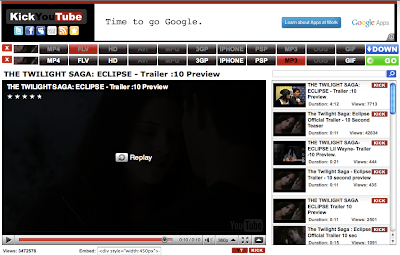
- Add the word Kick in front of YouTube in the URL (so, for example, it reads http://www.kickyoutube.com/watch?v=k33DEEI-15c&feature=popular)
- Hit enter, and that gives you a new KickYouTube frame around the video (like the picture below).
- Select the type of file you want to create (options include AVI, MP4, HD and iPhone).
- Click the green Go button to the right, which changes to Down (I know, this is a little weird).
- Right click on the Down button and click "save target as ..." or "save link as ..."
- Give it a name and save it on your hard drive or external drive.
- Share and play.
 It's a great way for anyone to save these videos, but it can be especially useful to teachers who maybe want to show an educational YouTube video (seriously, not all YouTube videos are sleazy and the weird - just, it seems, the most popular ones). Often, teachers can't access YouTube from their school computers. But with this tool they can download the video at home, save it to a jump drive and take it to school where they can do something that budget cuts and administrative roadblocks often prevent them from doing - use technology to help educate the masses.
Thursday, February 18, 2010
Poetry in Motion
I really ought to do this more often.
Recently, I spent a couple hours with Sarah Rose Thomas and her students at Coleman (Wisconsin) High School, about 40 miles north of Green Bay, and it was one of those afternoons that reminds me so much why I love working with educators and students.
Sarah’s classroom was filled with students who want to learn and a teacher uniquely skilled to teach them the subject matter that she so loves: poetry. At one point, preparing to read a poem to her students, she confessed that she cried the last time she read it. It’s personal, and it’s powerful.
The students, too, talked about how poems – those they read as well as those they write – sometime deeply affect them, including a student who turned to poetry after her grandfather passed away.
I was so glad I brought along my handheld digital video camera, as Sarah and her students were more than willing to talk about a subject that means so much to them: their love of poetry. And I am so glad that today we are able to readily tell these stories in online video that can be watched by people anywhere any time.
Videos such as this provide a visual glimpse into what happens thousands of times over in public school classrooms throughout our state, and does it in a way that people can see … and feel … and experience.
Incredible teachers like Sarah are connecting with students and making huge impacts on their lives. Students are giving back to the teacher and to each other, as these classrooms become communities of learning, sharing and growing. See for yourself:
Subscribe to:
Posts (Atom)
